
Co-writer
A brief desscription of Co-Writer before we had a chance to see the BEFORE and AFTER with a variety of students.
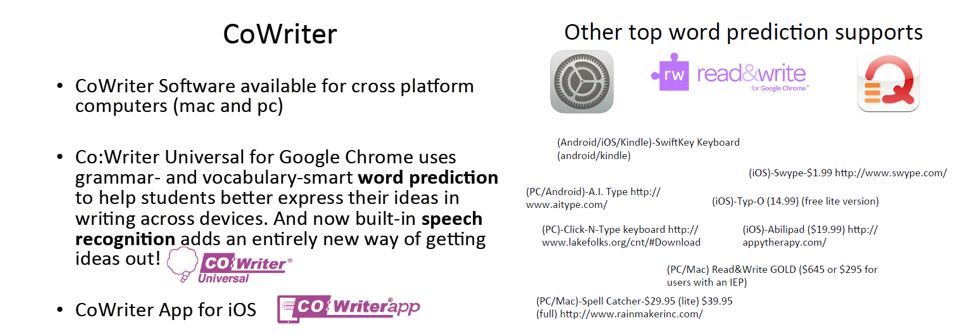

Students with: Fine motor / Grapho-motor deficiencies
Spatial / Depth perception issues
Spacing difficulties
Spelling difficulties
Written production challenges
Processing speed issues
Were able to produce very little written output, often lacking detail, many spelling mistakes, all over the page. One example provided one student's output by hand, QWERTY keyboard & Co-writer.

The SAME students were able to produce more detailed product. Thoughts were clearer, more descriptive and spelled correctly.
RESULTS:
Using Co-writer, students were able to produce without the physical pain or frustration of writing by hand. They also did not have to worry about spelling, and could use the word prediction to help with word choice. I suspect that this tool give many students much relief during the writing process.

A question was posed regarding student ability and how to accurately assess this ability if they are using assistive technology to produce. In order to answer this question, we must ask ourselves, "What are we assessing?"
We should be providing students opportunities to demonstrate their knowledge, in a variety of ways. Ultimately, it should not matter HOW they demonstrate it, as long as we have provided them with options that are appropriate for them. If we are limiting the students in the ways that they can provide us with information, we are really limiting our students and will not get an accurate account of their abilities.
Showbie Video

A teacher's account of her experience with Showbie was very interesting. She talked about the impact that her use of Showbie has had on her students. She described it as one of the most consistent ways to ensure assignment completion. She talked about the rate of assignment completion before and after Showbie. From 5.21% to .63%. Those are pretty impressive results!
Some of the benefits she listed were:
1. As all assignments are posted in Showbie, students can work directly in the Showbie App thus eliminating lost assignments crumpled up at the bottom of the bookbags.
2. As most students carry their phones / devices with them regularly, it is very beneficial to them that they can work on their assignments wherever they are. Students with executive functioning issues or home issues (perhaps not having access to computers at home) the Showbie app allows students to keep everything in one place.
The following video showed a student using the calendar within his device to keep organized and track assignment due dates, send themselves voice notes & reminders to help them stay organized.
"Technology is the great equalizer." It provides students with the tools they need to be independent learners, contributors and learners.
Presentations
Peter, Kate & Jane SAMR (graphics from presentation)
This presentation was very informative. The video of SAMR as explained by students was a great perspective on the model and how it works.
A few quotes that resonated with me:
"Learning is transformed through the use of technology."
"When we are more engaged & involved, significant improvements in learning are more likely to take place."
"Transformation = Learning"
VIDEO


SAMR model explained through Starbucks - a great idea.
Dan, Nikki & Tina UDL (graphics from presentation)
Learning opportunities for all
Video - This video did a great job at Unpacking Universal Design for Learning
Universal - Curriculum used and understood by everyone.
(Important that the learning opportunities be genuine for everyone)
Design - Ensure that the design is Flexible and can accommodate everyone.
~ Design for those is the margins and it would work for all.~
In doing so, make sure that you build in support and challenge for individual students.
Learning - WHAT
HOW OF LEARNING (An opportunity to gain knowledge, skills & enthusiasm)
WHY
In planning, it is important to always focus on the Learning s while considering "What are the barriers?"
Ensure that during the planning process, you are:
1. Providing multiple means of representation.
2. Providing multiple means of action and expression.
3. Providing multiple means engagement.

UDL Placemat (Barbara Wellsford)
These placemats that provide type-specific categories make these tools extremely useful in planning especially for teachers who are not very familiar with specific apps that are available.


Amanda, Andrea & Keir Assistive Technology (graphics from presentation)
This group presented using the Remote option on PREZI. This was a great option made available through the PREZI tool.
Assistive Tech Video - provided a great overview of Assistive Technology. A key message that was presented in this presentation was evident in cartoon below.
If you clear the path for students with special needs,
it clears the path for everyone.


Beth and Jean Luc UDL (graphics from presentation)
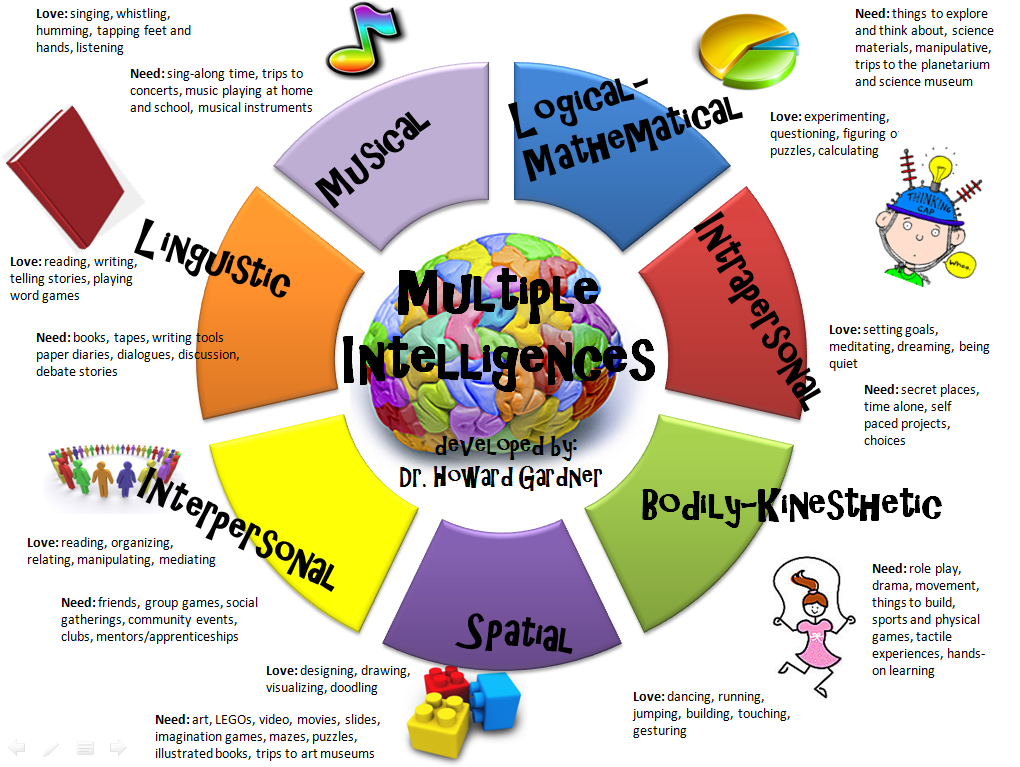
Beth and Jean Luc used a website to create an animated presentation about UDL. As these topics were covered by other groups, much of the information was already covered however they did discuss the importance of considering multiple intelligences when planning.
ONE SIZE DOES NOT FIT ALL

Molly and Matthew Assistive Technology (graphics from presentation)
Molly and Matthew discussed presented on assistive technology and reminded us that we have to remember that outside agencies (OT, Speech, LD) are also part of programming for our students with special needs. They also provide assistive technology for physical rehabilitation as well.
It is also important that our gifted students are not left behind.


